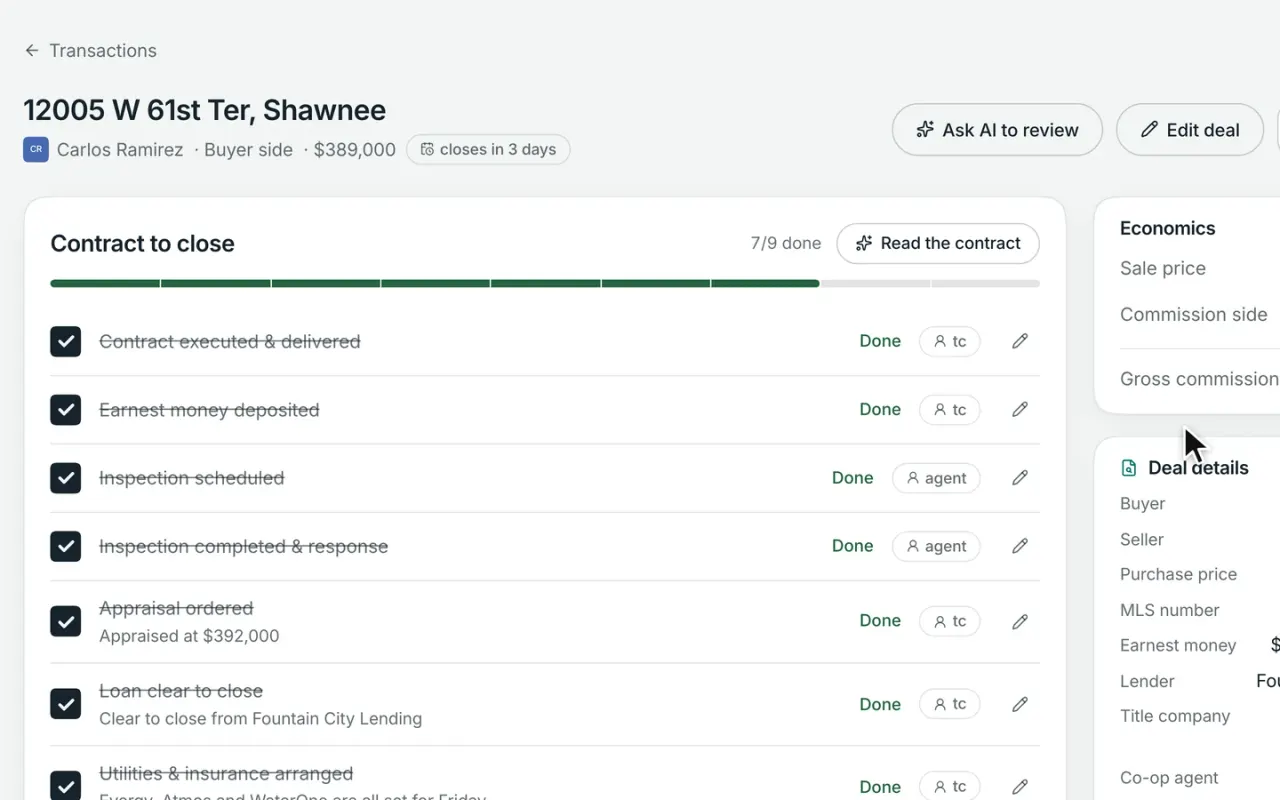
Keep every deal moving,from contract to close.
Track every transaction in one place, with key dates, documents, signatures, reminders, and e-signature built in. See what’s due next, what needs attention, and where every deal stands at a glance. Transaction management is included in Workspace Free, with no limit on the number of deals
- TrackSee every deal and exactly where it stands.
- DeadlinesKeep key dates and upcoming deadlines in view.
- SignSend documents for signature right from the transaction.
- DocumentsKeep contracts, signed copies, and files with the deal.
- RemindersGet a heads-up before important dates arrive.
- CloseWrap up the transaction and keep the client relationship moving forward.
One place for everythingbehind the transaction.
E-signature,built in.
Send contracts, disclosures and addenda from the deal. Your client signs on their phone, and the signed
- 1Upload your form
Any PDF: your state’s contract, a disclosure, a listing agreement. Save it as a template and use it again.
- 2Place the fields
Signatures, initials, dates, text and checkboxes, right where they go.
- 3Send it
Choose who signs and in what order, set a deadline, and the reminders go out on their own.
- Type or draw a signature
- Signatures, initials, dates, text and checkboxes
- Up to five PDFs signed in one sitting
- Everyone at once, or one after another
- A deadline, with automatic reminders
- Copies for anyone who needs one
- An emailed code before signing, when you want it
- An audit certificate added to the signed PDF
- No account or app for your client
- The signed copy files itself on the client and the deal
Comparing the cost of e-signature software.
The going rate for real estate
Prices from each company’s website, September 2026, for one agent. Confirm current pricing
Upload the contract.Workspace pulls out what matters.
Upload the signed purchase agreement and any addenda. Workspace pulls the key dates and details into the deal, creates the deadlines for you, and leaves anything you’ve
- Catches what needs attentionWorkspace flags missing documents, blank fields, and dates that don’t line up, then gives you a clear list of
what needs fixing. - Pre-fills your formsClient names, property details, price, and dates are pulled from the deal and placed into the right
fields for you. - Ask questions about your dealsAsk what’s closing this month, what’s due this week, or what needs attention next—and update the deal right
from the chat. - Send one document to multiple peopleSend the same document to up to 25 people at once. Each recipient gets their own
copy and certificate.
Workspace Pro is $99/month, or $59/month with
The whole client relationship,in one place.
From the first website inquiry to showings, contracts, closing, and future follow-up, everything stays connected to the same client record. Emails, texts, notes, documents, and transaction history are all there when you need them—even long after
- Mar 3Inquires about a home
on your website - Mar 9First showing
and follow-up notes - Apr 18Purchase agreement signed
- Apr 28Inspection completed
- Jun 12Closing complete
- 18 months laterThey’re ready to sell—and the full history
is still there
For one agent,or the whole office.

Workspace Free gives you the tools to track transactions, deadlines, documents, and e-signatures without adding another monthly bill. Upgrade to Pro when you want more AI to read contracts, pull out key details, and take more of the work

Team leads can see transactions across the team, while agents keep sensitive details like commission private. Everyone works the same deal record, so deadlines, documents, and next steps stay in one place without sharing logins or

Bring offices, teams, agents, and transactions into one Workspace, with roles and visibility set the way your business operates. Brokers and managers can see the activity they’re responsible for, while agents stay focused on their own clients and deals. Brokerage plans are tailored
Your questionsanswered.
Is it really free?
Yes. The transactions board, key dates, documents, checklists and e-signature are all on Workspace Free, with no cap on transactions and no fee per envelope. Workspace Pro, at $99/month or $59 with one of our websites, adds the full assistant: file reviews that run on their own, form filling
Is there a limit on e-signatures?
Only enough to stop spam. A free workspace can send 10 signing requests a day for each person. Pro raises the limit to
Are electronic signatures legally binding?
In the United States, yes. The federal ESIGN Act and UETA give electronic signatures the same standing as ink for real estate contracts. Every signed document carries an audit certificate showing who signed, when, and that nothing changed afterward. Check your brokerage’s
Do you include my state’s forms?
We don’t include association forms libraries, but you can upload the forms you already use, place the fields once, and save each one
Can it replace dotloop or SkySlope?
For most agents and small teams, yes. Transactions, documents and signing are all here, and they stay with the client record. If your brokerage requires a specific platform for submitting files, keep using
What does my client need?
A link. No account, no app and no password. It works on multiple devices, and a copy of the signed document goes to everyone
Does it track commissions?
Workspace tracks your expected commission on each deal and rolls those amounts into your pipeline and reports, so you can see what’s closing and what you expect to earn. It doesn’t replace brokerage accounting software for disbursements, agent
Comparing your options?
See how Broker & Agent compares with other leading real estate platforms, with features, pricing, and key differences laid out side by side. Every price is sourced and dated.
Bring your next dealinto Workspace.
Track the dates, documents, signatures, and next steps without adding another transaction platform to