Included with Workspace Free

From appointment to showing tour, all in one place.

Schedule appointments and showings right from the contact record, then plan multi-stop tours in an efficient driving order. Your Workspace calendar keeps the client, properties, notes, and schedule together, and appointments can be copied automatically to Google Calendar.

Calendar, Google Calendar connection, and tour planning are included with Workspace Free. Pro adds designed tour itineraries you can share with clients.

A calendar that keeps up with what actually happened.

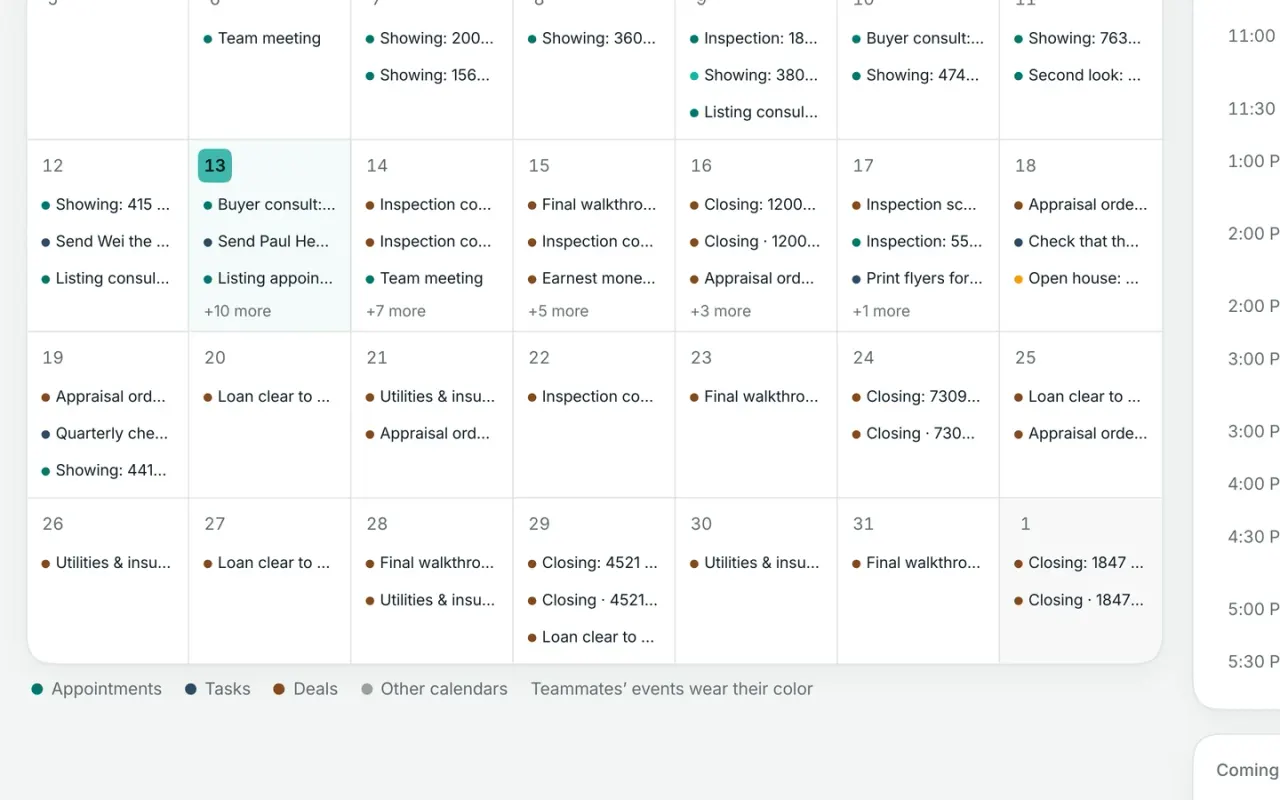
See your schedule by month, week, or day, and move appointments around with simple drag-and-drop. Showings, open houses, inspections, closings, and other appointment types stay organized in one place—and after each one, you can record whether it happened, was rescheduled, cancelled, or ended in a no-show.

Workspace also reminds you when an appointment still needs to be wrapped up.

  • Month, week, and daily agenda views
  • Drag to reschedule or adjust an appointment
  • Track held, rescheduled, cancelled, and no-show outcomes
  • Create your own appointment types
  • Keep the original time zone with every appointment
Appointment types
  • Showing
  • Listing appointment
  • Inspection
  • Closing
  • Open house
  • Call
  • + Your own
What happened
  • Held
  • Rescheduled
  • Cancelled
  • No-show
Appointments built for real estate

Use built-in real estate appointment types—or create your own—and record what happened afterward so the client history stays complete.

Showings, listing appointments, inspections, closings, open houses, and calls are ready to go. After each one, mark it held, rescheduled, cancelled, or no-show.

Keep Workspace and Google Calendar in sync.

Connect your Google account and see your Workspace appointments, timed tasks, and important deal dates alongside the rest of your calendar. Google events also appear in Workspace, so you can check your availability before scheduling a showing or meeting.

  • Workspace appointments and deal dates appear in Google Calendar
  • Google events show inside Workspace
  • See conflicts before you schedule
  • Uses the same Google connection as Gmail

Bring your other calendars into Workspace.

If you use Apple Calendar or another calendar service, add its iCal feed to Workspace so those events show alongside your appointments and showings. Workspace also gives you a private calendar link you can subscribe to from other calendar apps, including the calendar on your phone.

  • See other iCal calendars inside Workspace
  • Add your Workspace calendar to Apple Calendar and other apps
  • Use a private subscription link for your Workspace schedule

Every showing stays with the client.

Schedule a showing from the buyer’s record and it becomes part of their history automatically. As you work through a tour, Workspace keeps track of the homes you showed, so the next time you talk you can see exactly where you’ve been together instead of relying on notes or memory.

  • Schedule showings right from the client record
  • See every past showing in one place
  • Homes shown on a tour are logged automatically
  • Keep the full showing history with the buyer

Plan the tour. Let Workspace find the best route.

Add the homes your buyer wants to see, put them in the order you prefer, or let Workspace optimize the route for a more efficient drive. See every stop on the map, then mark homes as shown as you move through the tour so the client’s history stays current.

  • Add stops by MLS listing or address
  • See the full tour on a map
  • Optimize the route for a more efficient drive
  • Mark each home as shown as you go

A showing day, from plan to follow-up

Plan the tour, work through the showings, and keep the full history with the client.

  1. Build the tourAdd homes by MLS listing or address and see every stop on the map.
  2. Optimize the routeLet Workspace arrange the stops for a more efficient drive, then adjust the order if you want.
  3. Mark homes as shownAs you move through the tour, mark each property you actually showed.
  4. Keep the history with the clientEvery showing is added to the client timeline, so you can see exactly which homes you’ve toured together.
  5. Record how it wentMark the appointment held, rescheduled, cancelled, or no-show so the client record stays current.
Workspace Pro

Turn your showing plan into a client-ready tour.

With Workspace Pro, turn the tour you’ve already planned into a polished, branded page for your client. Share one link with the day’s itinerary while you keep managing the tour from Workspace.

  • Built from the tour you already planned
  • Branded for you and your business
  • One simple link to share with your client
Team logins

See your team’s schedule in one place.

View the calendars of the teammates you have access to, either together or one person at a time. Add someone to an appointment and it appears on their calendar automatically, with a notification so they know it’s there.

Calendar visibility follows the same sharing rules as the rest of Workspace, so private client activity stays private.

  • See the whole team or one person at a time
  • Each teammate has their own calendar color
  • Add teammates directly to appointments
  • Calendar visibility follows your Workspace permissions

Comparing your options?

See how Broker & Agent compares with other leading real estate platforms, with features, pricing, and key differences laid out side by side. Every price is sourced and dated. View all comparisons

Questions about calendar and showings

01

Does Workspace work with Google Calendar?

Yes. Google Calendar is included with Workspace Free. Connect your Google account and Workspace can add your appointments, timed tasks, and important deal dates to Google Calendar. Your Google events also appear inside Workspace, so you can see conflicts before scheduling something new.

Make changes in Workspace—edits made to the copied events in Google Calendar don’t sync back. The same Google connection can also be used for Gmail.

02

Can I see my Apple or Outlook calendar in Workspace?

Yes. If your calendar provides an iCal subscription link, you can add it to Workspace and see those events alongside your Workspace appointments.

You can also subscribe to your Workspace calendar from Apple Calendar, Outlook, or another calendar app using a private link. Both options are included with Workspace Free.

03

How do I schedule a showing?

Schedule it directly from the client’s record. Choose the date and time, and the showing is added to your Workspace calendar and the client’s history. If you’ve connected Google Calendar, it appears there too.

For a multi-home tour, add the properties to the tour planner. As you mark each home as shown, Workspace automatically adds it to the client’s showing history.

04

Can Workspace plan my showing route?

Yes. The tour planner on Workspace Free lets you add homes by MLS listing or address, see every stop on a map, and arrange them in the order you want. Workspace can also optimize the route for a more efficient drive.

As you move through the tour, mark each home as shown and Workspace adds it to the client’s showing history automatically.

05

Can I send a client the tour?

Yes. With Workspace Pro, you can turn the tour you’ve already planned into a polished, branded itinerary and send your client one simple link.

Tour planning itself—including route optimization and marking homes as shown—is included with Workspace Free. Pro adds the client-facing version you can share.

06

Can my team see each other’s calendars?

Yes. With team accounts, you can view the calendars of teammates you have access to, either together or one person at a time. Add a teammate to an appointment and it appears on their calendar automatically.

Calendar visibility follows the same Workspace sharing rules as your client records. Appointments tied to private clients stay private, while events with no client attached are visible only to the person who created them and anyone invited.

07

What happens after a showing?

Record how the appointment went—held, rescheduled, cancelled, or no-show—and Workspace keeps the outcome with the client record. If you used the tour planner, the homes you marked as shown are already on the client’s timeline.

That means the next conversation starts with context: you can see what they toured, when they saw it, and what happened afterward.

08

Which plans include calendar and showings?

Workspace Free includes the calendar, real estate appointment types and outcomes, Google Calendar connection, iCal subscriptions, and the showing tour planner with route optimization.

Workspace Pro adds polished client-facing tour itineraries and AI-assisted appointment scheduling.

For teams, shared calendar views are available with team accounts.

One Workspace for the workbehind every deal.

Workspace is opening soon. Join the early-access list to be among the first to get started.

Workspace is in open beta. Join free and bring your contacts with you.

Start free. Bring your contacts with you, and add Pro when you’re ready.