

Your website,run from one place.
Site Manager brings your site’s visitors, leads, chats, edits, blog and SEO together, with your team beside you. It comes with every

- One place
- For your site’s numbers, leads,
chats and edits - 5 teammates
- Free on Growth, each with
their own login - You decide
- The AI drafts; you choose
what goes live
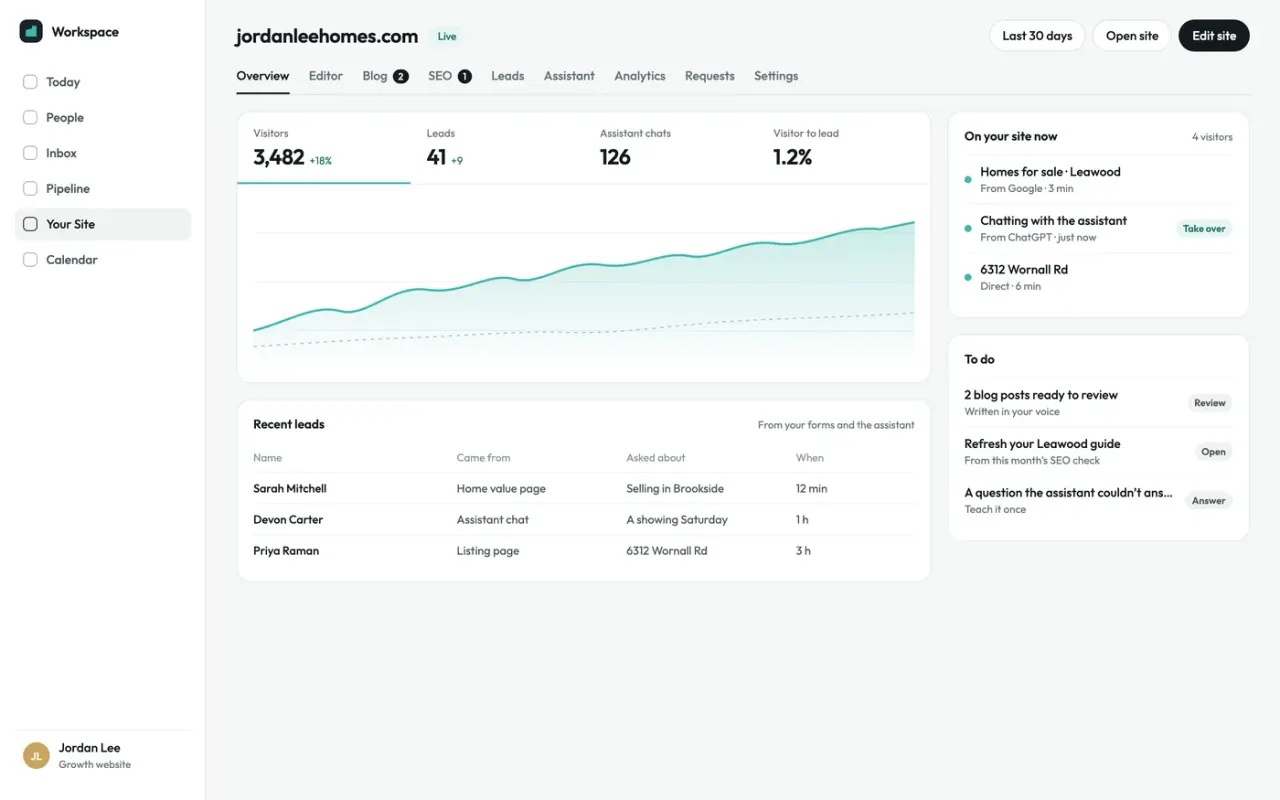
See how your site is doing at a glance.
Visitors, leads, chats and how many visitors become leads, with who’s on your site right now, where they came from and what
- Visitors, leads, chats and conversion
- Who’s on your site right now
- A short list of what needs you
Change your site with a live preview.
Update your contact details, your about section, your social links and an announcement beside a live preview of your site, then publish when it looks right. Every version is kept, so you can

Every lead from your site, in one list.
Form requests and assistant chats land in one list with the page they came from, and they can go to any CRM that accepts
Read every chat, and step in live.
See each conversation as it happened, with the questions the assistant couldn’t answer flagged so you can teach it once. Set its look and when it asks for details, pause it any time, and take over a chat to reply in
A blog in your voice, one to four posts a month.
Posts are planned around your market and drafted ahead in your voice, with a fair-housing check and an SEO score. Approve each one or let them publish on their own, and add authors
A monthly SEO check, with the fixes ready.
On Growth, your site is checked once a month for broken links, pages search engines can’t reach and pages worth refreshing. Fixes come drafted, up to six a month, and anything for our team goes
Know where your visitors come from.
Visitors by channel, from search and AI answers to social, email and ads, with the pages they landed on and the campaigns that brought them. No cookies
Ask for a change, and see when it’s done.
Ask our team for an edit or a hand with anything, in plain words. Simple questions are answered right away, anything else goes to a person, and every request shows where it stands
Bring your team in, free.
Invite up to five teammates on Growth at no cost, each with their own login. Viewers see the numbers, leads and chats and can take a chat over; editors can also change the site, its blog and the assistant. They see your website,
Who can do what
Teammates see your website,
| Feature | Viewer | Editor | You |
|---|---|---|---|
| See visitors, leads and chats | |||
| Take over a chat | |||
| Edit the site and the blog | — | ||
| Set up the assistant | — | ||
| Requests, invites, plan and settings | — | — |
Five teammates are free on Growth. Need
Comparing your options?
See how Broker & Agent compares with other leading real estate platforms, with features, pricing, and key differences laid out side by side. Every price is sourced and dated.
What’s in each plan
Site Manager comes with every website we build. See pricing
- Overview, analytics and leads
- Editor with a live preview
- Requests to our team
- Everything in Launch, plus
- Monthly SEO checkWith fixes drafted
- Blog in your voice
- Assistant conversations and live takeover
- Teammates5 free
Questions aboutSite Manager.
What is Site Manager?
The app that runs your website: visitors and where they come from, leads and chats, edits, your blog and your SEO,
When can I use it?
It’s ready as soon as you buy your website, and it comes with every website we build, so there’s nothing
Can I edit my own website?
Yes. Change your contact details, about section, social links and announcements beside a live preview, then publish. Bigger changes go to our team as a request, and your plan includes
Can my team help manage the site?
On Growth, invite up to five teammates free, as viewers or editors. They see your website,
Will the AI publish anything without me?
Only if you tell it to. Blog posts wait for your approval unless you turn on auto-publish, posts with something flagged always wait, and SEO rewrites never go live until
Do I need Workspace to use it?
No. Site Manager is its own app, and it comes with every website, so you
Which plans include Site Manager?
Every website. Growth adds the blog, the assistant’s conversations and live takeover, drafted SEO fixes
More website features
All about our websites
See your new site before you decide.
Tell us a little about you and what you’re looking for in a website, and we’ll send you a link to a live preview of your new site. No payment info