Included with Workspace Free

Put follow-ups and routine tasks on autopilot.

Set simple rules for the repetitive parts of your business. When a lead comes in, send a response. When someone goes quiet, add a follow-up to your Today list. When a contact reaches a new stage, notify the right person. Set it up once, and Workspace handles the flow from there.

Texts always wait for your approval before they’re sent.

Automations and the Today list are included with Workspace Free. Pro adds AI-powered steps.

Automations that make sense at a glance.

Every automation is written in plain English, so you can see what triggers it and what happens next before you turn it on. For example: “If a new lead goes untouched for four hours, add a call to my Today list and mark it important.” Build your own using familiar actions like tasks, emails, texts, reminders, appointments, stage changes, and follow-up steps.

  • Follow-up plans that guide a contact through a series of steps
  • Rules that automatically respond when something changes
  • Recurring routines that run daily, weekly, or monthly

What can start an automation?

Choose the event, behavior, date, or schedule that should put an automation to work.

WhenWhat starts it
A new lead comes inA new lead arrives, a buyer or seller fills out a form, or someone enters your pipeline.
Something changes with a lead or dealA stage changes, a deal needs attention, closing gets close, or it’s time for post-closing follow-up.
Someone goes quietA new lead hasn’t been contacted, an active lead stops responding, or too much time has passed since your last follow-up.
An important date is coming upA birthday, home anniversary, or another date worth remembering is approaching.
It’s time to runStart it yourself or have it run automatically on a daily, weekly, or monthly schedule.

Automations can apply to you, a team, or the entire Workspace, with controls over who can change them.

The follow-up you’re most likely to forget, already handled.

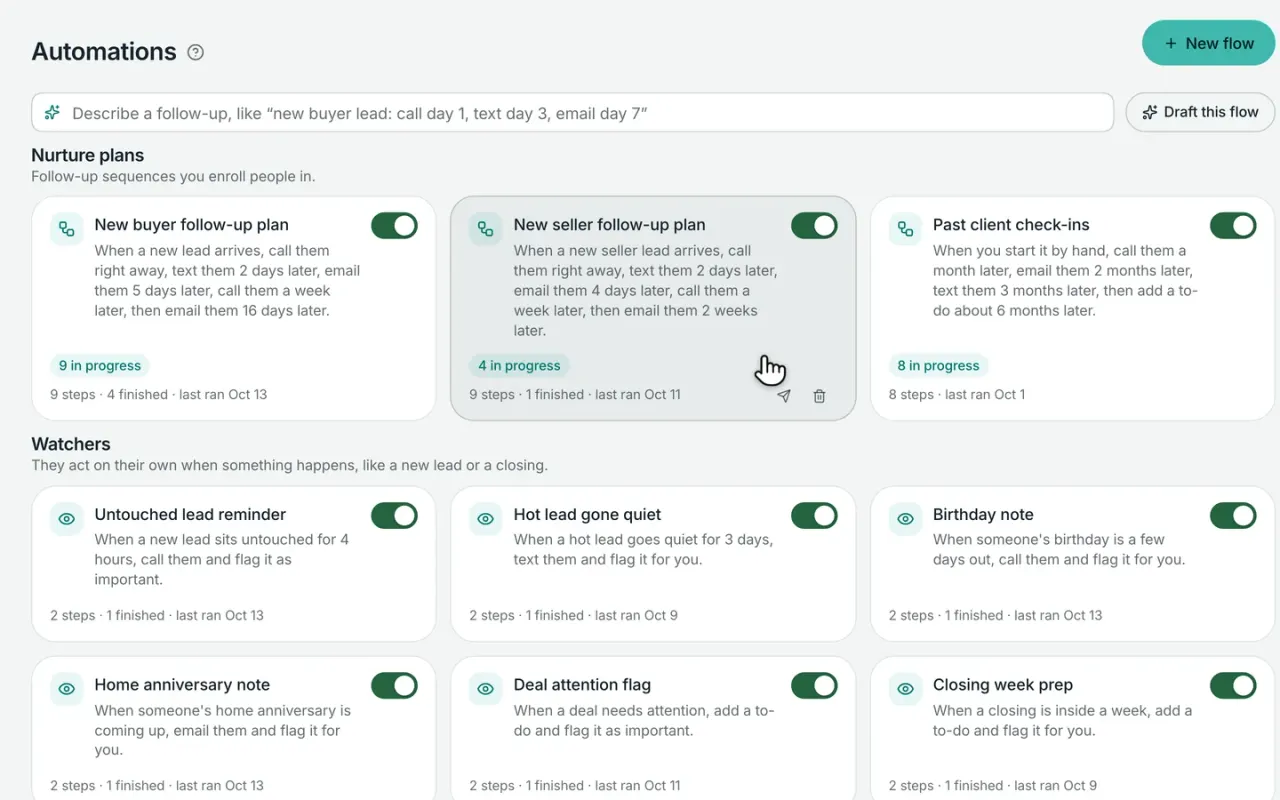
Workspace comes with ready-to-use automations for the moments that are easy to miss—new leads that haven’t been contacted, active leads that go quiet, birthdays, home anniversaries, upcoming closings, and past-client follow-up. They’re ready when you start, and you can turn off or adjust anything that doesn’t fit the way you work.

Messages are prepared as drafts first, so you stay in control of what gets sent.

  • Common follow-up automations ready from day one
  • Messages wait for your approval before they send
  • Names, property details, and other known information filled in automatically

Common follow-ups, already built in to Workspace

Workspace comes with automations for the moments agents are most likely to miss. Turn them on as-is, adjust them to fit your business, or create your own. Any email or text starts as a draft for your approval.

New leadsNew lead needs attention“When a new lead hasn’t been contacted within four hours, add a call to my Today list and mark it important.”
New leadsNew lead follow-up“When a new lead comes in, remind me to call right away, then prepare follow-up texts and emails over the next two weeks.”
New leadsSeller lead follow-up“When a new seller lead arrives, call them right away, text them 2 days later, email them 4 days later, call them a week later, then email them 2 weeks later.”
Hot leadsHot lead goes quiet“When a hot lead hasn’t responded for three days, prepare a text and put the follow-up back on my list.”
SphereBirthday“A few days before a client’s birthday, remind me to reach out.”
SphereHome anniversary“When someone’s home anniversary is coming up, email them and flag it for you.”
DealsDeal needs attention“When a deal needs attention, add a to-do and flag it as important.”
DealsClosing this week“When a closing is less than a week away, add a reminder to my Today list.”
DealsWeekly client update“Once a week for every active deal, email them and flag it for you.”
DealsPost-closing follow-up“When a deal closes, prepare a thank-you text and remind me to follow up.”
Past clientsPast-client follow-up“When you start it by hand, call them a month later, email them 2 months later, text them 3 months later, then add a to-do about 6 months later.”
Starter flowStay-in-touch reminder“When you haven’t reached out to someone in 30 days, call them.”


When they reply, automation steps aside.

By default, follow-up pauses as soon as a client replies by text or email, so automated messages don’t keep coming after the conversation has started. Workspace puts the contact back in front of you, and you can resume the automation later if it still makes sense.

You can also start, pause, or stop an automation for any individual contact without affecting everyone else.

  • Follow-up pauses automatically when someone replies
  • Start, pause, or resume an automation for any contact
  • Duplicate tasks and message drafts are prevented
  • If a step keeps failing, Workspace pauses it and alerts you

You stay in control of what gets sent.

Automation can prepare texts and emails for you, but nothing has to go out before you’re ready. Drafted messages appear on your Today list for review, and you can approve, edit, or skip them. Emails can also be set to send automatically during normal daytime hours, while texts always wait for your approval.

  • Review, edit, or approve drafted texts and emails
  • Choose automatic sending for email when it makes sense
  • Texts always wait for your approval
  • Business texts send from your Workspace phone number

Know who needs your attention today—and why.

Workspace brings follow-ups, new leads, overdue outreach, past-client check-ins, and automation tasks into one prioritized Today list. Each person appears with the reason they’re there, so you can quickly decide whether to call, reply, approve a message, snooze it, or mark it done.

As you use it, Workspace learns which types of reminders are useful to you and keeps the list focused on what matters most.

  • One prioritized list for today’s follow-up
  • See why each person needs attention
  • Call, reply, approve, snooze, or complete from the list
  • Optional morning summary to start your day
Workspace Pro

Let AI handle the writing.

With Workspace Pro, automation steps can use AI to draft the work for you—from personalized texts and emails to tasks, listing presentations, net sheets, and tour plans. You can also describe the automation you want in plain English and let Workspace draft the flow for you to review.

Messages can be written using the context of the contact and your business, so follow-up feels more personal than a generic template.

  • Draft personalized texts, emails, and follow-up tasks
  • Create listing presentations, net sheets, and tour plans
  • Describe an automation in plain English and let AI build the first draft
  • Review and approve the work before it runs

Comparing your options?

See how Broker & Agent compares with other leading real estate platforms, with features, pricing, and key differences laid out side by side. Every price is sourced and dated. View all comparisons

Questions about automations and follow-up

01

Does Workspace have drip campaigns?

Yes. Workspace calls them nurture plans—multi-step follow-up sequences that can combine calls, texts, emails, tasks, and timed waits. Start with a ready-made plan for new leads or build your own around the way you follow up.

Nurture plans are included with Workspace Free. Messages can wait as drafts for your approval, and the follow-up pauses automatically when a contact replies.

02

Will automations text my clients without me knowing?

No. Automated texts always wait for your approval before they’re sent. They appear on your Today list as drafts, where you can review, edit, send, or skip them.

Email can be set to send automatically if you choose, but only during daytime hours. Ready-made automations start with messages in draft mode, so you stay in control from the beginning.

03

What happens when a client replies?

By default, Workspace pauses that person’s automation as soon as they reply by text or email. That keeps automated follow-up from continuing while you’re having a real conversation.

When you’re ready, you can resume the automation, stop it, or start a different one.

04

What is the Today list?

The Today list brings your most important follow-ups into one prioritized view. Each person appears with the reason they need attention—like a new lead, an unanswered message, overdue follow-up, or an active client who’s gone quiet.

From the list, you can call, reply, approve a drafted message, snooze the follow-up, or mark it complete. It’s designed to answer one simple question: who should I focus on next?

05

Can Workspace handle birthday and home anniversary follow-up?

Yes. Workspace includes ready-made automations for both. Birthdays can trigger a reminder to reach out, while home anniversaries can prepare an email for you to review—or send it automatically if you choose.

Birthday and home anniversary dates can also come over with your contact import, so you don’t have to add them again by hand.

06

What can AI do in an automation?

With Workspace Pro, AI can draft personalized texts, emails, tasks, and other client-facing work as part of an automation. It can also help create things like listing presentations, net sheets, and tour plans.

You can even describe the automation you want in plain English and let Workspace build the first draft for you. Anything AI writes can be reviewed before it goes out, and automated texts always wait for your approval.

07

Will automations create duplicate tasks?

No. Workspace checks for work that’s already waiting before creating another task or message draft, so the same follow-up doesn’t keep piling up. Larger batches are spaced out instead of appearing all at once, and if an automation step keeps failing, Workspace pauses it and lets you know.

08

Which plans include automations and follow-up?

Workspace Free includes the core automation tools: ready-made follow-up plans, custom rules, pause-on-reply, and the Today list.

Workspace Pro adds AI to help write personalized messages, create follow-up steps, and build automations from plain-English instructions.

Business-number texting is available separately with the $33/month phone add-on.

One Workspace for the workbehind every deal.

Workspace is opening soon. Join the early-access list to be among the first to get started.

Workspace is in open beta. Join free and bring your contacts with you.

Start free. Bring your contacts with you, and add Pro when you’re ready.