Team logins are $12/month each on Workspace Free and $59 on Pro. Routing, ponds, messaging and team reports come with them on either plan.
Westside team4 agents
DBDaniel BrooksTeam lead12 leads
MTMaya TorresAgent9 leads
JEJordan EllisAgent7 leads
Lead pond3 waiting · first claim wins
Commission stays privateTo the agent and their managers
$12a month per login on Workspace Free
$59a month per login on Pro, each one a full Pro user
4 rolesMember, Team lead, Admin and one Owner
2 waysto share, set per team: Open book or Private desks
A login for everyone, and a role that fits
Invite each agent or manager with their own login, their own Today list and the same inbox. Give them a role: Member, Team lead (a team can have co-leads), Admin, or the one Owner. Each login is prorated from the day someone joins, and billing stops the day they’re offboarded.
Member, Team lead, Admin and one Owner
Agent or manager logins
Prorated when they join, stopped when they leave
Today5 things · the top ones matter most
Call Sarah MitchellNew lead, pre-approved
9:00Call
Book the second showing8207 Delmar · asked for Thursday
10:30Text
Send Devon compsOverland Park sale
1:00Email
Confirm Friday inspectionThe Vances
4:00Call
Decide who sees what, team by team
Each team picks Open book, where teammates see each other’s contacts, or Private desks, where they see only what’s shared with them. Above the teams, choose whether leadership can open records below them or sees totals only. When a manager opens a record from above, it’s written to the access log, and on Pro each person’s assistant sees only what that person can.
Open book or Private desks, set per team
Leadership opens records, or sees totals only
Every look from above is logged
LOG
Maya opened Devon CarterA team lead’s look · written to the access log
North team · who sees whatSet by the team’s leads
Open bookTeammates see each other’s contacts
Private desksTeammates see only what’s shared with them
MemberTeam leadAdmin
The sharing settings, side by side
Two choices per team, and one for the whole workspace. New teams start as Open book.
SettingSet forWhat it means
Open bookEach teamTeammates see each other’s contacts.
Private desksEach teamTeammates see only what’s shared with them.
Team leads can open members’ recordsA team on Private desksThe team’s leads can open a member’s record when they need to, and every look is logged.
Leadership can open records below themThe whole workspaceYou, admins and team leads can open the records underneath, and every look goes to the access log.
Leadership sees totals onlyThe whole workspaceRolled-up numbers travel up and records don’t. The owner can lock this in place.
Contacts created while “Leadership sees totals only” is on keep that promise, even if the setting changes later.
Whose contact is it?
Every contact is marked as company-sourced or agent-sourced, and website and portal leads always stay with the team. For contacts agents add themselves, choose “What agents bring in is theirs” or “Everything entered here is a company asset”. Share any contact with a teammate or a whole team, and decide whether agents export their own book freely or need a sign-off first.
Company leads and agent-sourced contacts, marked on every record
Share a contact with a person or a team
Exports free, or with a sign-off from their team lead
DC
Devon CarterViewed 6 homes · 1h ago
PR
Priya RamanAsked about her home value
SM
Sarah MitchellSaved a search · just now
Pre-approvedBuying3 bd · Brookside
From your website · 6312 Wornall Rd
CallTextEmail
Talk it through without leaving the CRM
Every workspace gets #general, and each team gets its own channel automatically. Add channels of your own, message a teammate directly, and attach a contact, a document, a Studio item or a file so everyone is looking at the same thing. Mention someone in a contact’s notes and they get an email: “Maya mentioned you on Devon Carter.”
#general plus a channel for every team
Replies, reactions and search, updated live
Mentions in contact notes arrive by email
SM
Sarah MitchellBuyer · Brookside · pre-approved
Hot
Email
Could we see 6312 Wornall this weekend?
Text
Saturday at 11 works. I’ll send the address.
Note
Wants a finished basement. Lender: First Federal.
New leads reach the right agent
Send each lead source to one person, round robin through a list or a whole team, or into a pond where the first teammate to claim a lead gets it. A pond can belong to the whole workspace or to one team, and new teammates join their team’s rotation automatically.
Rules by source, first match wins
Round robin through people or a team’s roster
Ponds for the workspace or for one team
3
3 leads up for grabsFirst claim wins
Claim
Where new leads goFirst matching rule wins
Leads from Your site
Round robinMaya → Jordan → Chris
Leads from Zillow
One personJordan Ellis
Leads from Open house
A pondAnyone on the team claims
3 ways
to route a new lead
One person, round robin, or a pond where the first teammate to claim it gets it. Rules go by source, and contacts someone adds by hand stay with them.
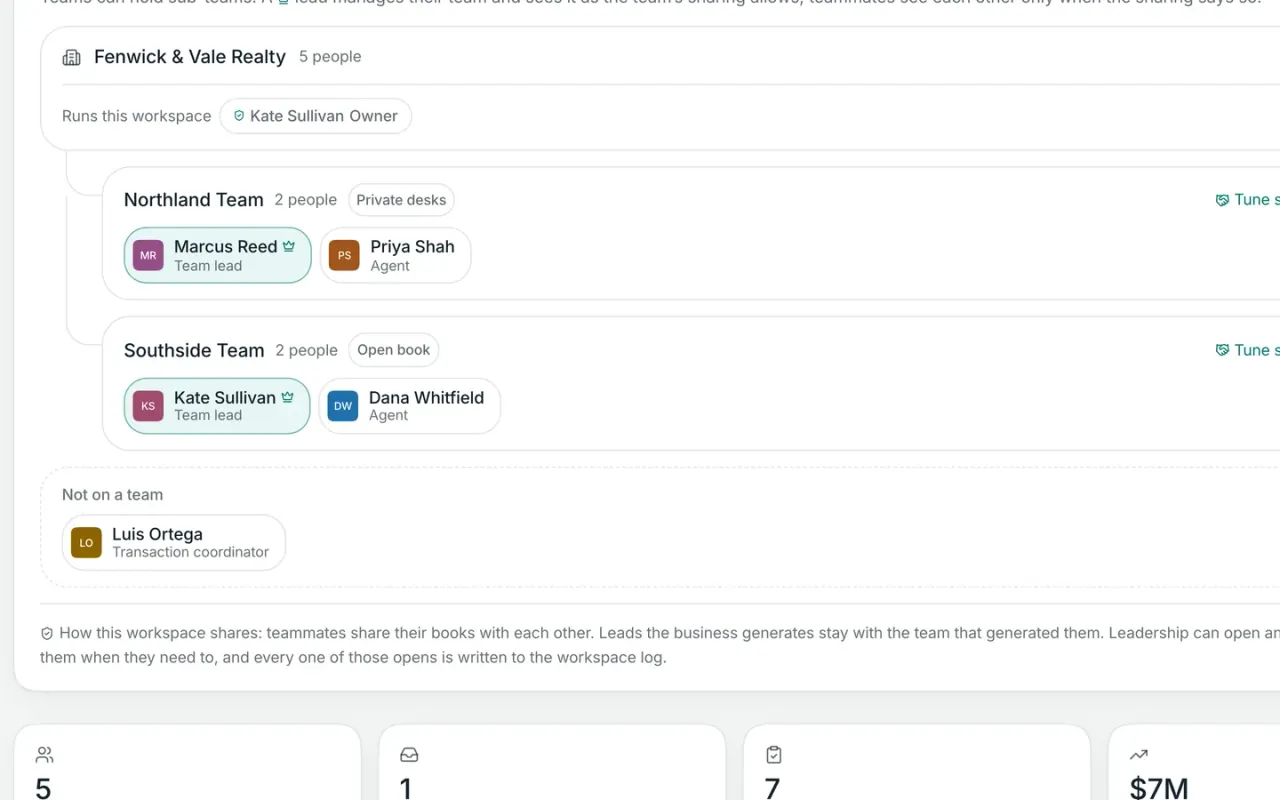
Nest teams inside teams as deep as your company goes. Each team keeps its own leads and its own sharing, with a pond of its own if you want one, and the Team page rolls the numbers up per team so you can drill from the whole company down to one group. For a brokerage, that’s the front office in one workspace: leads, contacts, who sees what and where new leads go.
Teams and sub-teams, nested as deep as you need
Leads, sharing and ponds per team
Numbers rolled up per team, with drill-down
AVG
Speed to leadLast 90 days · median first touch
4 min
Where your leads came fromLast 90 days
Your website46%
Referrals22%
Open houses14%
Zillow11%
Other7%
Brokerage plan
When an agent leaves, the business stays
Offboard someone and their sign-in stops immediately. Their company leads go to a teammate or back to the workspace pond, you can download their personal book as a spreadsheet to hand over, and you can end the shares they made. Transactions and documents stay where they are.
Sign-in stops the moment you confirm
Company leads reassigned or back to the pond
Transactions and documents stay put
4521 Holmes StThe Vances · Buyer side
Under contract
PDFPurchase agreementSigned
PDFSeller’s disclosureSigned
PDFInspection reportReceived by email
PDFAddendum 12 of 3 signed
PDFLead-based paint disclosureMissing
Forward documents to your workspace address and they file themselves here.
Offboarding an agent, step by step
One confirm from an owner or admin, and nothing slips through.
Sign-in stopsThe moment you confirm, they can’t get back in.
Company leads moveTo a teammate you pick, or back to the workspace pond for anyone to claim.
Their book is handed overDownload their personal contacts as a spreadsheet to give them. The hand-over is logged either way.
Shares are endedContacts they shared with teammates keep that access until you end it, one by one.
The deals stayTransactions and documents stay where they are, and their login stops billing.
What’s on Free, and what’s on Pro
Workspace Free is $0, permanently. Workspace Pro is $99/month, or $59/month with one of our websites. See pricing
Nested teams across a brokerage and agent offboarding with lead transfer are on the Brokerage plan, quoted after scoping.
Comparing your options?
See how Broker & Agent compares with other leading real estate platforms, with features, pricing, and key differences laid out side by side. Every price is sourced and dated. View all comparisons
Both. On Workspace Free each login is $12/month and includes the shared inbox, roles, shared or private contacts, lead routing, ponds, team messaging and the team dashboard. On Workspace Pro each login is $59/month, a full Pro user, with the same team tools. Nested structure and offboarding with lead transfer are on the Brokerage plan, quoted after scoping.
02
What should a real estate team look for in a CRM?
Three things. Every agent needs their own login, you need to decide who sees which contacts, and new leads need to reach the right person fast. Workspace covers all three: four roles, Open book or Private desks for each team, and routing by source with round robin and ponds. Contacts are unlimited on every plan.
03
Can agents keep their contacts private from the team?
Yes. Set a team to Private desks and teammates see only what’s shared with them. You can let the team’s leads open members’ records, and every look is logged. Across the workspace you can also choose “Leadership sees totals only”, so the numbers roll up and the records stay with the agent.
04
Who owns the leads when an agent leaves?
Website and portal leads always stay with the team. For contacts agents add by hand, you choose: what agents bring in is theirs, or everything entered here is a company asset. Separate settings decide whether company leads never leave in an export, leave with a sign-off, or go with the agent.
05
What happens when I offboard an agent?
Their sign-in stops immediately. You pick a teammate to take their company leads, or send them back to the workspace pond. You can download their personal book as a spreadsheet to hand over and end the shares they made. Transactions and documents stay where they are, and their login stops billing.
06
Can my team message each other inside Workspace?
Yes, with team logins on Workspace Free or Pro. There’s #general, a channel for every team made automatically, channels you add, and direct messages. Attach contacts, documents, Studio items and files, reply, react and search. Mention a teammate in a contact’s notes and they get an email.
07
Can a manager see what agents are working on?
Yes, within the rules you set. Leadership can open records below them, with every look written to the access log, or you can choose that leadership sees totals only. With team logins, the Team page shows each person’s contacts, leads waiting, new leads this week, transactions and closings year to date.
08
Is Workspace a CRM for brokerages?
Yes, for the front office. Nest teams as deep as your company goes, each with its own leads, sharing and pond, and roll the numbers up per team. Company leads stay company leads, exports can need a sign-off, and offboarding hands leads to a teammate in one step. Brokerages are on the Brokerage plan, quoted after scoping.